
Show viewers what's playing with a Spotify widget that actually matches your stream.
Build scene-ready music cards, vertical side panels, retro overlays, floating transparent layouts and more - all from one editor built for streamers. Utilises smart polling to reduce API calls and keep everything running smoothly.
Live demo browser sources
Glass Wave
Soft glassmorphism card with generous spacing.
Neon Bar
Wide stream overlay with strong accent progress.
Compact Pill
Slim lower-third style widget for busy overlays.
Vertical Spotlight
Stacked art-first card for side panels.
Retro CRT
8-bit arcade monitor styling with scanlines, phosphor glow and pixel vibes.
Future Core
Futuristic HUD design with sleek panels, neon edges and sci-fi energy.
macOS Deck
Desktop-inspired frosted card with polished chrome and clean Apple-like spacing.
Windows Panel
OS-inspired media panel with structured layout, taskbar feel and modern desktop styling.
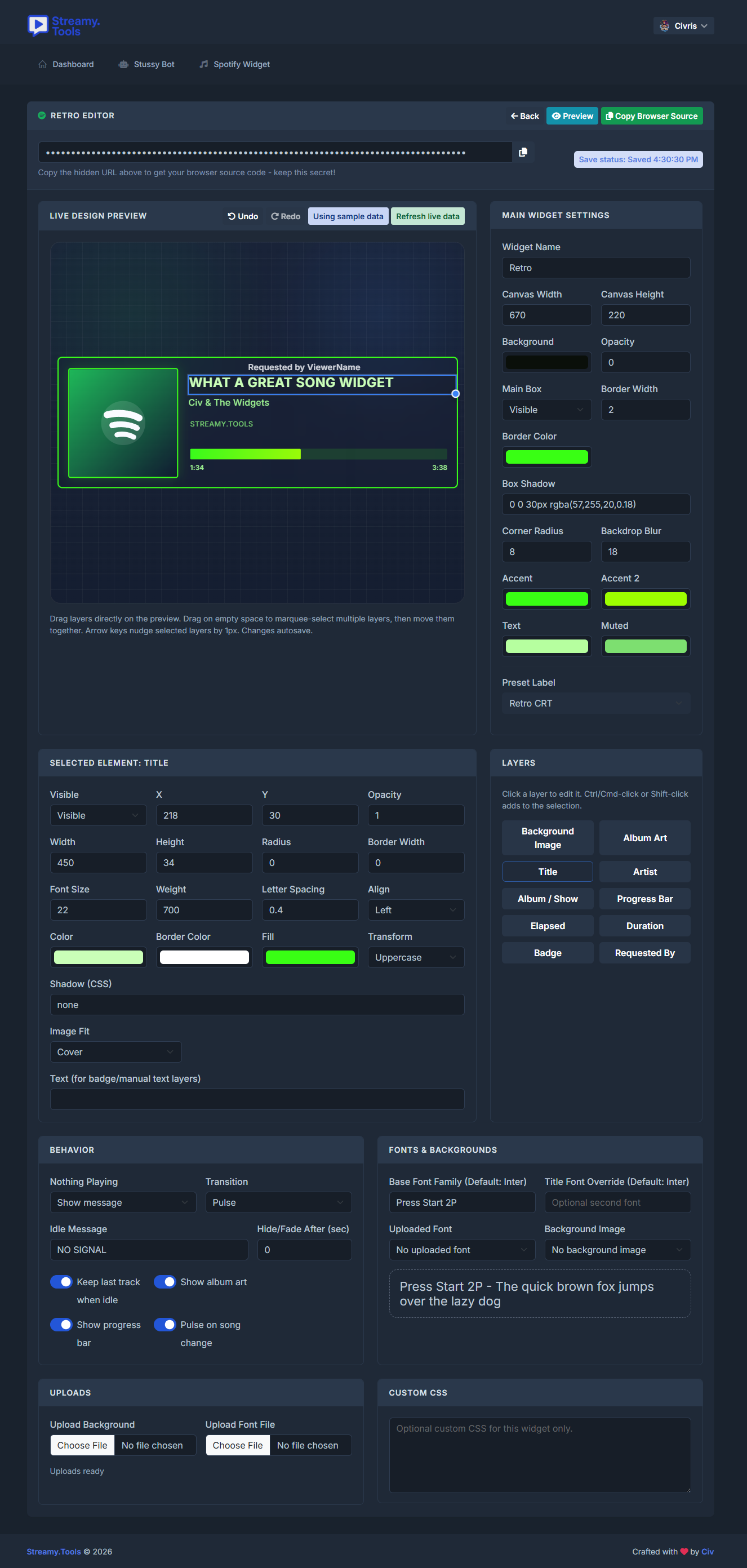
Advanced drag and drop editor
Start with presets
Choose from polished styles like Glass Wave, Retro CRT, Future Core, macOS Deck, Windows Panel and more, then make them your own.
Move multiple layers together
Drag-select items, shift-click to build a selection, move groups together and use arrow keys for 1-pixel nudges.
Undo and redo while you experiment
The editor keeps a deep history so creators can try bold changes without worrying about losing earlier layouts.
Upload fonts and backgrounds
Match your stream branding with custom backgrounds, fonts, transparent scenes, floating layers, rounded panels and more.
How creators use it
1. Pick a preset that fits the scene
Start with a clean lower-third, a bold side panel, a retro CRT overlay or an OS-inspired layout.
2. Fine tune every layer
Move album art, title, artist, progress, badges and status text exactly where they need to sit in your scene.
3. Match your stream branding
Use transparent backgrounds, rounded boxes, borders, shadows, custom colors, uploaded fonts and background art.
4. Copy the browser source URL into OBS
Make separate widgets for gameplay, BRB, webcam, intro and music-only scenes without rebuilding from scratch each time.
Ready to make your own?
Connect Spotify once, build as many scene variations as you want, and drop them straight into your stream as browser sources.